Most commented posts
- Resistor Decade Box — 15 comments
- Desoldering Station — 12 comments
- 3D Printer UV Curing Device — 6 comments
- ESR-Meter – Update — 4 comments
- Audio Spectrum Analyzer — 4 comments

Mar 25 2008
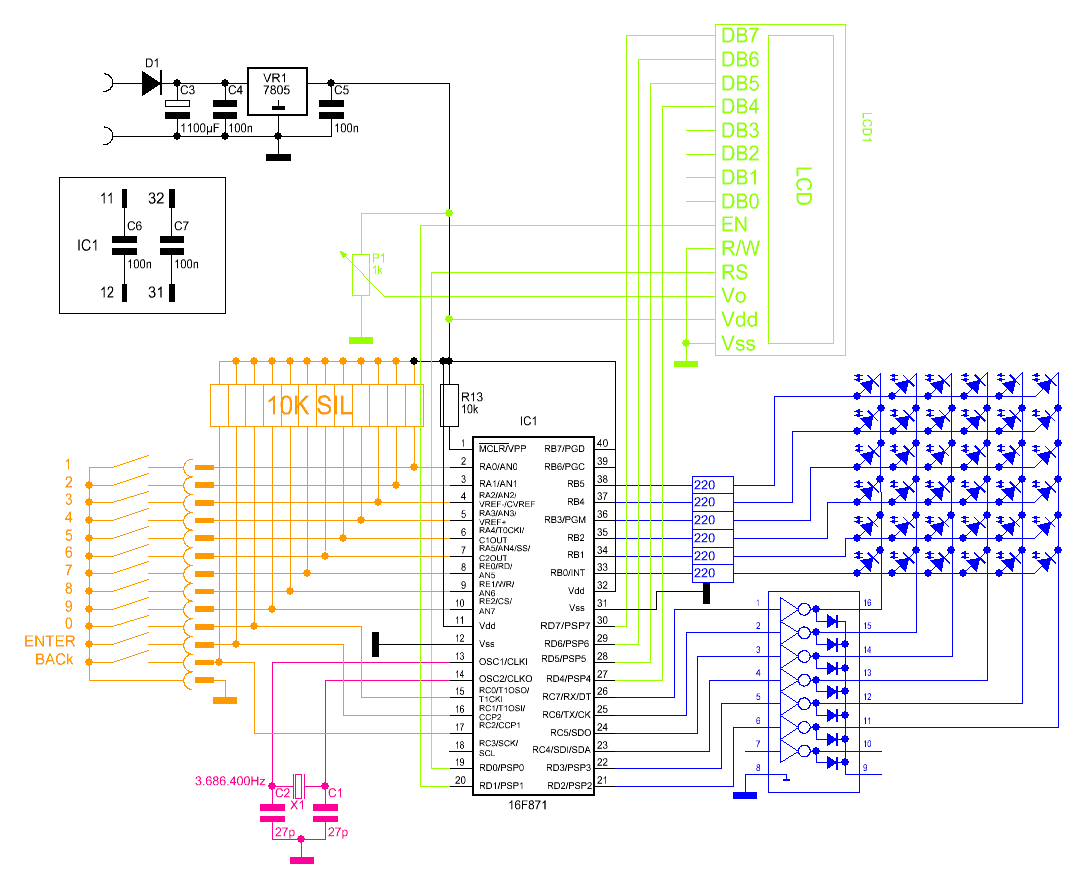
With the first version was not easy to set the time. So I made a second version.
Circuit:
Keyboard:


Mainprint (With osme small faults in).


Mar 26 2008
I received 2 transformers (2x30V 750VA) that I bought on Kapaza. 1 of those 2 I’m going to use for this project.

Mar 27 2008
I got the question how I could do a double sided pcb with my single sided exposure box. Well, the trick is to use a L shape piece of PCB. You can drill some guide holes in it, but it is not necessary.


I tape the sheets to the pcb, so you get a “bag” where the pcb can slide in.

For the exposure you have to remove the foil on both sides off the pcb. During the exposure you can place a black piece of paper on top against reflecting light.
Mar 27 2008
I had problems with under exposed pictures, so I decided to make a led light to mount underneath the camera.
The circuit:

Pcb design:

Pictures:


The pcb get’s sandwiched between the tripod and the camera.


After some tests this didn’t work as great as expected, so please save yourself the trouble of building this yourself.
Mar 29 2008
I made this project 2 years ago but I didn’t put it on my site. Yesterday somebody asked for pictures so I decided to ad it as a project.
The base of my solder aid is an old cutting board, on which I attached an arm that is pulled down by a spring.


(There is another spring on the other side)
I put the smd component on the pcb underneath the screw. Then it stays in place during soldering. On top of the arm I’ve placed 2 leds for some extra light.


(Capacitor in the picture above is 0805 so 2.0 mm × 1.25 mm)
Apr 05 2008
In the meanwhile the tank has gotten his pcb’s to.
The sensors:

The main board (the leds are for debugging here):

The motors:


Apr 11 2008
The code is ready:
The code for the robot car:
    Device              16F628A
    Config WDT_OFF, PWRTE_Off, LVP_OFF, MCLRE_on, INTRC_OSC_NOCLKOUT
    ALL_DIGITAL         TRUE
    PORTB_PULLUPS       = 1
'Declaraties
    'Sensoren
    Symbol sensorR      = PORTA.6
    Symbol sensorL      = PORTA.7
    'Motoren
    Symbol motorvooruit = PORTA.2
    Symbol motorachteruit  = PORTA.3
    Symbol stuurLinks   = PORTA.1
    Symbol stuurRechts  = PORTA.0
    'Terugkoppeling stuur
    Symbol stuursensL   = PORTB.0
    Symbol stuursensM   = PORTB.1
    Symbol stuursensR   = PORTB.2
    'Leds
    Symbol led1         = PORTB.3
    Symbol led2         = PORTB.4
    Symbol led3         = PORTB.5
    Symbol led4         = PORTB.6
    Symbol led5         = PORTB.7


'Wachten voor dat er bogonnen wordt
'(De sensoren hebben tijd nodig om op te starten)
    DelayMS 1000

'Stuur initialiseren
    'Staat het stuur in het midden?
    If stuursensM = 0 Then
        GoTo klaarinit      'Direct naar klaarinit gaan
    EndIf
    'Staat het stuur links?
    If stuursensL = 0 Then
        GoTo links         'Naar links gaan
    EndIf
    'Staat het stuur rechts?
    If stuursensR = 0 Then
        GoTo rechts        'Naar rechts gaan
    EndIf
    'In geen stand (geen terugkoppeling)
    'Eerst volledig naar rechts draaien
    High    stuurRechts
    While   stuursensR = 1
        ;Lusje totdat de stuursensor rechts laag wordt
    Wend
    Low     stuurRechts
    DelayMS 500
    'Naar gedeelte gaan voor als het stuur naar rechst staat
    GoTo    rechts

rechts:
    'Naar links sturen
    High    stuurLinks
    While   stuursensM = 1
        ;Lusje totdat de stuursensor midden laag wordt
    Wend
    Low     stuurLinks
    DelayMS 500
    GoTo    klaarinit

links:
    ;Naar rechts sturen
    High    stuurLinks
    While   stuursensM = 1
        ;Lusje totdat de stuursensor midden laag wordt
    Wend
    Low     stuurLinks
    DelayMS 500

klaarinit:
    High motorvooruit
    Low  motorachteruit
    High led3
    GoTo main


'Hoofdprogramma
main:
    ;links opstakel
    If sensorL = 0 Then
        DelayMS 10
        High    led1
        GoSub   linksDect
    EndIf
    Low led1
    ;rechts opstakel
    If sensorR = 0 Then
        DelayMS 10
        High    led5
        GoSub   rechtsDect
    EndIf
    Low led5


GoTo main

rechtsDect:
    High led4
    ;stukje achteruit
    Low     motorvooruit
    DelayMS 10
    High    motorachteruit
    DelayMS 1000
    Low  motorachteruit
    Low     led4
    ;Draaien
    High    stuurLinks
    While stuursensL = 1
        ;Lusje totdat de stuursensor links laag wordt
    Wend
    Low     stuurLinks
    ;Stukje vooruit
    DelayMS 10
    High    motorvooruit
    DelayMS 1000
    Low     motorvooruit
    ;Stuur  terug recht zetten
    High    stuurRechts
    While   stuursensM = 1
        ;Lusje totdat de stuursensor midden laag wordt
    Wend
    Low     stuurRechts
    DelayMS 10
    High    motorvooruit


Return

linksDect:
    High  led2
    ;stukje achteruit
    Low     motorvooruit
    DelayMS 10
    High    motorachteruit
    DelayMS 1000
    Low  motorachteruit
    Low     led2
    ;Draaien
    High    stuurRechts
    While stuursensR = 1
        ;Lusje totdat de stuursensor links laag wordt
    Wend
    Low     stuurRechts
    ;Stukje vooruit
    DelayMS 10
    High    motorvooruit
    DelayMS 1000
    Low     motorvooruit
    ;Stuur  terug recht zetten
    High    stuurLinks
    While   stuursensM = 1
        ;Lusje totdat de stuursensor midden laag wordt
    Wend
    Low     stuurLinks
    DelayMS 10
    High    motorvooruit


Return

;bij fout
GoTo main
End
The code for the tank:
Device 16F628A

Config WDT_OFF,PWRTE_OFF,LVP_OFF,MCLRE_ON,INTRC_OSC_NOCLKOUT, BODEN_OFF

ALL_DIGITAL true

Symbol      motorLinksV = PORTA.2
Symbol      motorLinksA = PORTA.3
Symbol      motorRechtsV = PORTA.6

Symbol      motorRechtsA = PORTA.7


Symbol      sensorL = PORTA.0
Symbol      sensorR = PORTA.1

Symbol      led1 = PORTB.0
Symbol      led2 = PORTB.1

Symbol      led3 = PORTB.2

Symbol      led4 = PORTB.3
Symbol      led5 = PORTB.4

Clear

High motorLinksV
DelayMS 10
High motorRechtsV

Low motorRechtsA
Low motorLinksA

main:

If sensorL = 0 Then
            'hoog maken van led1
            High led1
            'stoppen van motoren vooruit
            Low motorLinksV
            Low motorRechtsV
            '100ms wachten
            DelayMS 100
            'achteruit rijden
            High motorLinksA
            DelayMS 10
            High motorRechtsA
            'hoogmaken van led3 en Led4
            High led3
            High led4
            '1 s wachten
            DelayMS 1000
            'stoppen met rijden
            Low motorLinksA
            Low motorRechtsA
            Low motorLinksV
            Low motorRechtsV
            'laag maken van led3 en led4
            Low led3
            Low led4
            '100 ms wachten
            DelayMS 100
            'led2 hoogmaken
            High led2
            'draaien van tank
            High motorLinksV
            DelayMS 10
            High motorRechtsA
            '500ms draaien
            DelayMS 500
            'laagmaken led2
            Low led2
            'stoppen met draaien
            Low motorLinksV
            Low motorRechtsA
            '10 ms stoppen
            DelayMS 10
            'terug vooruit rijden
            High motorLinksV
            DelayMS 10
            High motorRechtsV


Else
            'als sensor links niets detecteert gaat led1 niet branden
            Low led1
EndIf
If sensorR = 0 Then
            'hoog maken van led5
            High led5
            'stoppen van motoren vooruit
            Low motorLinksV
            Low motorRechtsV
            '100ms wachten
            DelayMS 100
            'achteruit rijden
            High motorLinksA
            DelayMS 10
            High motorRechtsA
            'hoogmaken van led3 en Led4
            High led3
            High led4
            '1 s wachten
            DelayMS 1000
            'stoppen met rijden
            Low motorLinksA
            Low motorRechtsA
            Low motorLinksV
            Low motorRechtsV
            'laag maken van led3 en led4
            Low led3
            Low led4
            '100 ms wachten
            DelayMS 100
            'led2 hoogmaken
            High led2
            'draaien van tank
            High motorLinksA
            DelayMS 10
            High motorRechtsV
            '500ms draaien
            DelayMS 500
            'laagmaken led2
            Low led2
            'stoppen met draaien
            Low motorLinksA
            Low motorRechtsV
            '10 ms stoppen
            DelayMS 10
            'terug vooruit rijden
            High motorLinksV
            DelayMS 10
            High motorRechtsV


Else
            'als sensor rechts niets detecteert gaat led5 niet branden
            Low led5
EndIf

GoTo main
End
Apr 20 2008
I have decided to release all the designs and the code off this project:
The layout of V2.1:


The layout of V2.2:


There are still some errors in this layout. If you want to use the design I recommend that you compare it to the circuit and correct it.
The code:
    Device 12F629
    Config INTRC_OSC_NOCLKOUT, WDT_OFF, PWRTE_ON, MCLRE_ON, CP_ON
    ALL_DIGITAL     TRUE

    Dim tellerlaag  As Byte
    Dim tellerhoog  As Byte
    Dim ICounter    As Byte
    Clear

    Symbol stroomSensor = PORTB.0
    Symbol knopOmhoog   = PORTB.4
    Symbol knopOmlaag   = PORTB.5
    Symbol UitR         = PORTB.2
    Symbol UitL         = PORTB.1

    Low UitR
    Low UitL

Main:
    While 1 = 1
        If knopOmhoog = 0 And knopOmlaag = 1 And stroomSensor = 0 Then
            GoSub Omhoog
        EndIf
        If knopOmlaag = 0 And knopOmhoog = 1 And stroomSensor = 0 Then
            GoSub Omlaag
        EndIf
    Wend


Omhoog:
    Low UitL
    High UitR
    DelayMS 500
    While 1 = 1
        If knopOmlaag = 0  Or stroomSensor = 1 Then
            Low UitR
            GoTo wachten
        EndIf
    Wend


Omlaag:
    Low UitR
    High UitL
    DelayMS 500
    While 1 = 1
        If knopOmhoog = 0  Or stroomSensor = 1 Then
            Low UitL
            GoTo wachten
        EndIf
    Wend


wachten:
    DelayMS 1000
    Return

End


 Dutch
Dutch 