PIC Controlled Robotcar
This is a project I started 1 year ago but I never finished because I could not program pic microcontrollers. The goal was to build a car with 2 micro switches on the front. If these switches hit something the car should reverse and continuo in another direction. As an extra difficulty I've put some leds on it (head lights, indicators, brake light) that have to be lighted on the correct time. I'm restarting this project because I'm learning picbasic now.
Some pictures from what I have already:
On this picture you can see the microswitch.:
The leds:
![]()
The motors:
This project is stopped because the car is lost somewhere in my junk. I didn’t search for it because it didn't work very good (The front axle is solid, so the car cannot turn good).
A few weeks ago I got this programmable robotcar from my neighbor. I decided I'm going to use it for this project.
Some pictures:
The sensors I want to use to detect objects (I have 4 of them)
With thanks to Jens for the optocouplers and Ludo for the robot car!!
In school we got the assignment to make a robot car for a project week. Therefore I decided to use this car for that project. The project week is after the Easter vacation. The hardware must be finished then, the software will be written in that week.
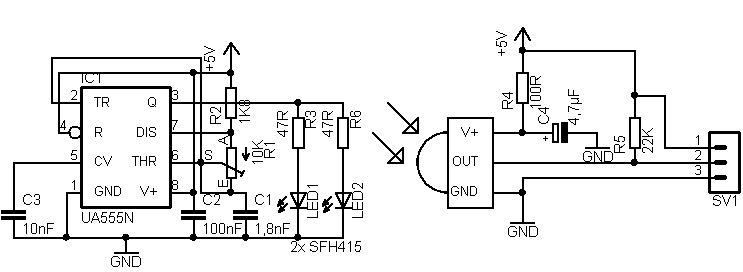
Today I made a IR approximation sensor. The sensors I wanted to use before turned out to be a bit disappointing after some tests. I could not get the range to extend 5mm. For the new version I have used some louse IR leds and TSOP1738 ir receivers. I have a test version on breadboard.
Video:
The green led on the bottom is the output.
I don't know for sure witch pic I'm going to use, but I think it’s going to be a 16F627. To control the motors I'm going to use a L293 H-bridge IC.
Today I have designed a pcb for the pic and motor control.
Circuit:
Today I etched and partially assembled a sensor pcb (I don't have all the components yet)
Our workgroup is going to build 2 robot cars, 1 off them is already described, the other one is a tank.
Pictures:
Today I etched and assembled the main pcb for my robot car. Then I mounted it and wired it all up.
Pictures:
In the meanwhile the tank has gotten his pcb's to.
The sensors:
The main board (the leds are for debugging here):
The motors:
The code is ready:
The code for the robot car:
Device 16F628A Config WDT_OFF, PWRTE_Off, LVP_OFF, MCLRE_on, INTRC_OSC_NOCLKOUT ALL_DIGITAL TRUE PORTB_PULLUPS = 1 'Declaraties 'Sensoren Symbol sensorR = PORTA.6 Symbol sensorL = PORTA.7 'Motoren Symbol motorvooruit = PORTA.2 Symbol motorachteruit = PORTA.3 Symbol stuurLinks = PORTA.1 Symbol stuurRechts = PORTA.0 'Terugkoppeling stuur Symbol stuursensL = PORTB.0 Symbol stuursensM = PORTB.1 Symbol stuursensR = PORTB.2 'Leds Symbol led1 = PORTB.3 Symbol led2 = PORTB.4 Symbol led3 = PORTB.5 Symbol led4 = PORTB.6 Symbol led5 = PORTB.7 'Wachten voor dat er bogonnen wordt '(De sensoren hebben tijd nodig om op te starten) DelayMS 1000 'Stuur initialiseren 'Staat het stuur in het midden? If stuursensM = 0 Then GoTo klaarinit 'Direct naar klaarinit gaan EndIf 'Staat het stuur links? If stuursensL = 0 Then GoTo links 'Naar links gaan EndIf 'Staat het stuur rechts? If stuursensR = 0 Then GoTo rechts 'Naar rechts gaan EndIf 'In geen stand (geen terugkoppeling) 'Eerst volledig naar rechts draaien High stuurRechts While stuursensR = 1 ;Lusje totdat de stuursensor rechts laag wordt Wend Low stuurRechts DelayMS 500 'Naar gedeelte gaan voor als het stuur naar rechst staat GoTo rechts rechts: 'Naar links sturen High stuurLinks While stuursensM = 1 ;Lusje totdat de stuursensor midden laag wordt Wend Low stuurLinks DelayMS 500 GoTo klaarinit links: ;Naar rechts sturen High stuurLinks While stuursensM = 1 ;Lusje totdat de stuursensor midden laag wordt Wend Low stuurLinks DelayMS 500 klaarinit: High motorvooruit Low motorachteruit High led3 GoTo main 'Hoofdprogramma main: ;links opstakel If sensorL = 0 Then DelayMS 10 High led1 GoSub linksDect EndIf Low led1 ;rechts opstakel If sensorR = 0 Then DelayMS 10 High led5 GoSub rechtsDect EndIf Low led5 GoTo main rechtsDect: High led4 ;stukje achteruit Low motorvooruit DelayMS 10 High motorachteruit DelayMS 1000 Low motorachteruit Low led4 ;Draaien High stuurLinks While stuursensL = 1 ;Lusje totdat de stuursensor links laag wordt Wend Low stuurLinks ;Stukje vooruit DelayMS 10 High motorvooruit DelayMS 1000 Low motorvooruit ;Stuur terug recht zetten High stuurRechts While stuursensM = 1 ;Lusje totdat de stuursensor midden laag wordt Wend Low stuurRechts DelayMS 10 High motorvooruit Return linksDect: High led2 ;stukje achteruit Low motorvooruit DelayMS 10 High motorachteruit DelayMS 1000 Low motorachteruit Low led2 ;Draaien High stuurRechts While stuursensR = 1 ;Lusje totdat de stuursensor links laag wordt Wend Low stuurRechts ;Stukje vooruit DelayMS 10 High motorvooruit DelayMS 1000 Low motorvooruit ;Stuur terug recht zetten High stuurLinks While stuursensM = 1 ;Lusje totdat de stuursensor midden laag wordt Wend Low stuurLinks DelayMS 10 High motorvooruit Return ;bij fout GoTo main End
The code for the tank:
Device 16F628A Config WDT_OFF,PWRTE_OFF,LVP_OFF,MCLRE_ON,INTRC_OSC_NOCLKOUT, BODEN_OFF ALL_DIGITAL true Symbol motorLinksV = PORTA.2 Symbol motorLinksA = PORTA.3 Symbol motorRechtsV = PORTA.6 Symbol motorRechtsA = PORTA.7 Symbol sensorL = PORTA.0 Symbol sensorR = PORTA.1 Symbol led1 = PORTB.0 Symbol led2 = PORTB.1 Symbol led3 = PORTB.2 Symbol led4 = PORTB.3 Symbol led5 = PORTB.4 Clear High motorLinksV DelayMS 10 High motorRechtsV Low motorRechtsA Low motorLinksA main: If sensorL = 0 Then 'hoog maken van led1 High led1 'stoppen van motoren vooruit Low motorLinksV Low motorRechtsV '100ms wachten DelayMS 100 'achteruit rijden High motorLinksA DelayMS 10 High motorRechtsA 'hoogmaken van led3 en Led4 High led3 High led4 '1 s wachten DelayMS 1000 'stoppen met rijden Low motorLinksA Low motorRechtsA Low motorLinksV Low motorRechtsV 'laag maken van led3 en led4 Low led3 Low led4 '100 ms wachten DelayMS 100 'led2 hoogmaken High led2 'draaien van tank High motorLinksV DelayMS 10 High motorRechtsA '500ms draaien DelayMS 500 'laagmaken led2 Low led2 'stoppen met draaien Low motorLinksV Low motorRechtsA '10 ms stoppen DelayMS 10 'terug vooruit rijden High motorLinksV DelayMS 10 High motorRechtsV Else 'als sensor links niets detecteert gaat led1 niet branden Low led1 EndIf If sensorR = 0 Then 'hoog maken van led5 High led5 'stoppen van motoren vooruit Low motorLinksV Low motorRechtsV '100ms wachten DelayMS 100 'achteruit rijden High motorLinksA DelayMS 10 High motorRechtsA 'hoogmaken van led3 en Led4 High led3 High led4 '1 s wachten DelayMS 1000 'stoppen met rijden Low motorLinksA Low motorRechtsA Low motorLinksV Low motorRechtsV 'laag maken van led3 en led4 Low led3 Low led4 '100 ms wachten DelayMS 100 'led2 hoogmaken High led2 'draaien van tank High motorLinksA DelayMS 10 High motorRechtsV '500ms draaien DelayMS 500 'laagmaken led2 Low led2 'stoppen met draaien Low motorLinksA Low motorRechtsV '10 ms stoppen DelayMS 10 'terug vooruit rijden High motorLinksV DelayMS 10 High motorRechtsV Else 'als sensor rechts niets detecteert gaat led5 niet branden Low led5 EndIf GoTo main End